Showing posts with label Fantasy. Show all posts

Sunday, February 2, 2014

Reaper Bones Kobolds


I polished off a dozen kobolds from the first Reaper Bones kickstarter. Their small size made their details feel even shallower than some of the other Bones figures I've painted up, but the wash helped pull out their features. I still felt like I was guessing when picking out things like their teeth, but they should be serviceable as dungeon chumps for the players to cut down.


I glued them to washers and extended the dungeon floring they were standing on with some milliput sculpted to look like flagstones. I suppose they turned out ok, but I looking forward to getting back to some metal or plastic historicals next.

Tuesday, January 21, 2014

Easing back into painting with Reaper Bones Beetles

We're moved in, the holidays have wrapped up, but I'm still unpacking and setting up our new house. Happily, I managed to get a bit of painting done: a pair of Reaper Bones beetles. Not too impressive, but it's nice to be able to get back to the hobby finally.

George and Ringo

Sunday, December 22, 2013

Dungeon Crawl Junior


We're finally getting settled into our new home and with our Christmas shopping and parties wrapped up I managed to get some minis on the table. My son and I have messed about with a variety of D&D type games, but no matter how simple I tried to tweak the rules, they always still felt too complicated. I did some on-the-fly game creation this afternoon that stripped them down to the bare minimum and had two hours of fun with the boy today. He was able to internalize the rules quickly and ran a dungeon crawl for me for over an hour. Details on dungeon crawling for kindergartners after the jump.

Dungeon Crawl Junior

Materials Needed

  • Miniatures (good guys and bad guys)
  • A board (terrain tiles or dry erase grid map or 3d dungeon terrain)
  • polyhedral dice (d4, d6, d8, d20)

Getting Started

  1. One player is the GM, everyone else are the adventurers
  2. An adventuring player can control more than one miniature. 
  3. Each adventurer player should look through the good guy miniatures and pick out some cool figures. There should be at least four good guy miniatures. 
  4. Get some paper and write down the stats for each good guy figure.

Statting up the Good Guys

  1. Take a look at the figure's armor. If it has armor or a shield, it has Armor 2. If it has armor AND a shield, it is Armor 3. Otherwise it is Armor 1.
  2. Assign a class die to the figure. The class die is used for the figure's Hit Points and Attacks. If the figure is a wizard, its class die is a D4. If the figure is knight or barbarian its class die is a D8. Everybody else (clerics, thieves, halflings, etc.) have a D6 class die.
  3. Roll hit points. Each figure rolls its class die and records the number as its Hit Points. Reroll 1s.
  4. Figures that are spellcasters (wizards, witches, shamans, etc.) pick one spell.

Statting up the Bad Guys

  1. Monsters usually have 1 hit point. They have Armor assigned in the same manner as good guys, but they have the option of swapping 1 point of Armor for an extra hit point (for example, an orc with a shield could be considered Armor 1 with 2 Hit Points instead of Armor 2 with 1 Hit Point)
  2. Most baddies have a D6 class die. Small or weak creatures are a D4, big ones are a D8.
  3. For Junior Dungeon Crawlers, keep the number of bad guys equal to the good guys. If the adventurers know how to use choke points, focus fire and how to protect their weak figures, you can increase the number of monsters. Twice as many baddies as good guys feels about right.

Playing the Game

The good guys explore the dungeon laid out by the GM. If they try to listen at a door, climb a wall, disable a trap, etc. the adventurer can roll the d20 with success on an 11 or higher.

When the good guys encounter some baddies a fight might break out.

Combat

  1. Each side rolls a D20 to determine initiative. The higher roll goes first, all of the figures moving and attacking before play passes to the other player. Initiative is rerolled each round. Ties go to the adventurers.
  2. Most figures can move 6 squares and attack once. (Small or slow figures like kobolds, golems, etc. only move 4 squares. Fast figures can move 8 squares)
  3. When a figure attacks, it rolls its class die. A value higher than the target's Armor deals 1 hit point of damage (monsters usually go down in 1 hit, but adventurers usually have a larger starting hit point total).
  4. Monsters reduced to 0 hit points are dead. Adventurers reduced to 0 hit points begin bleeding, losing 1 hit point per round, dying at -10. Did the party get wiped out? Maybe they are captured instead and awaken in the prisons of the dungeon's monsters, or sold back to the local town as hostages.
  5. Adventurers with spells can cast their spell once per combat.
After defeating a group of monsters collect XP and treasure. 2d6 gold per group of monsters, x10 if its their lair or a tough battle.

Adventurers can return to town and heal to max or spend gold to buy equipment, extra warriors, healing potions, etc.

Special Rules

  • Spears can attack a figure two squares away (even attacking past friendly characters)
  • Bows and crossbows suffer a -1 penalty attacking at more than 6 squares.
  • Two handed weapons get a +1 attack bonus.
  • Wielding two weapons can reroll a miss once per combat.

Some Sample Spells

  • Water Wave: Targets a group of bad guys. Roll a d20 for each, knocking any who roll under 10 prone. Prone figures need to spend a whole round getting up. Attacks against prone figures that miss may be rerolled once.
  • Magic Missile: Deals 1 point of damage to target figure. Shoot an extra missile at 3rd level and two extra at 5th level.
  • Turn Undead: Roll an attack against each undead in the combat. Rolling above their Armor forces the undead to flee. Undead is destroyed if the roll was the die's max.
  • Heal: A friendly character gains 3 hit points.

XP and Leveling

Any time the adventurers encounter monsters, give them XP for the encounter (they can't get XP from the same group of monsters if they encounter them a second time after fleeing for example).

Divide XP among the whole group of adventurers. Reaching their level x100 in XP gains them a new level. Roll the class die again and add the value to the adventurer's Hit Point total.

Here are the monster XP values and some notes I used:

Orc: 5xp  (Armor 1. HP 1 or 2. Attack D6)
Skeleton: 5xp (Armor 2 (3 vs. arrows). HP 1. Attack D6.)
Kobold: 3xp (Armor 1. HP 1. Attack D4. Slow-only moves 4 squares)
Rat: 1xp (Armor 1. HP 1. Attack D4-1)

Messing about with dungeon features like traps, teleport circles, funky fountains, etc. should also grant some XP. 5 to 20 seems reasonable. 

And that's it! I don't think there's anything ground breaking here, but these worked quite well for the boy and me for an afternoon of orc bashing fun. 

Tuesday, November 5, 2013

Reaper Goblins in their Fall Collection

I've spent the last few weeks applying my creative skills to my son's Halloween costume rather than figure painting, but I managed to finally polish off these goblins to join my earlier Halloween Reaper Bones figures.


I had some challenges with this group. The milliput I used to extend the flagstone bases didn't dry properly and needed to be replaced, the reposing using the hot water technique failed to set, and the detail and sculpting on these figs was still pretty shallow. Once I got to painting though, things moved rapidly. I have a ton of greenskin goblins in storage, so I opted for a slightly different color scheme for these guys.


In any case, I was happy to get them finished and they turned out well enough for tabletop skirmishes. And with these figures wrapped up I'll likely be going on a brief painting hiatus. Our new home has finally been completed, we have a settlement date, and I expect to be moving out of our temporary residence within the next few weeks. I'm looking forward to unpacking all of the figures, games and terrain currently in storage and getting back to rolling dice soon!

Tuesday, October 15, 2013

Flesh and Bones. More Halloween Reaper figures


I dug out a few more horror themed figures from the Reaper Bones pile. First up, a Frankenstein-esque flesh golem, cobbled together from a variety of corpses.

Flesh Golem

"C'mere, give us a hug."

Another extremely bizarre pose, and despite the flexible Bones material, I was unable to contort his arms into anything more fitting. Maybe he should be throwing his arm around his best bro' Sasquatch.

I used three different skin tones: a cold gray, a dark chocolate and a grisly tan to suggest the creature was stitched together from at least three different corpses. Seams received a wash of dark Vallejo Game Color Charred Brown, with brighter red highlights. Stitches got a stripe of black to get them to pop, followed by a highlight of tan.

Arrius, Skeletal Warrior


This undead warrior was part of the Grave Danger set from the original Bones Kickstarter. I wanted to do something a bit different with his armor, so opted for a deep green coupled with a coppery brown for his cloak and trim.


This is a nice figure, a decent pose, and while his armor is a bit extravagant, it isn't covered in skulls or spikes. His cricket bat weapon is a touch odd, but I figure you could remove it and replace it with a sword or something.

Tuesday, October 8, 2013

More Spooky Reaper Bones: Vampire, Rat Swarm and Bat Swarm

I'm having fun picking out more of the Halloween Bones from last year's Kickstarter. Sticking to the theme is also helping me crank out some of the less interesting sculpts, like these swarms of rats and bats.


The mass of bats had some pretty shallow detail, and a confusing collection of wings, heads and bodies. I used some pretty stark gray drybrushing and a combination of brown paint and inks to pick out the furry bodies, but this still a pretty chaotic mini. If I had to do it again I might go for a pure comic book feel and pick out the bats in bright, blood red to give them a little character.


To match the flagstone bases of the giant rats, I sculpted some dungeon floors out of milliput for these rat swarms. It was fun! I started adding flagstone bases to a few other minis, and even picked up some sculpting tools. Hoping to break out the green stuff and do some more extensive sculpting, as even flagstone bases are tricky for me. Practice makes perfect.


For the vampire, I wanted to keep attention on the actual figure, so eschewed using bright colors on his cloak, saving the deep red for his armor (inspired by the design of Dracula's armor in Francis Ford Coppola's Dracula movie from the 90's). Skin was a simple gray three tone with blue ink wash

I was tempted to add a glass of red liquid in that outstretched hand. "I never drink... wine."

I've been checking out the Bones II Kickstarter currently running, and I'm not quite as hot on it as the original. Reaper seems to be loading it up with miniatures that are pretty similar to the ones from Bones I. I might pick up a few of the individual add on figures, but with a stockpile of Bones figures on hand, I think I may pass on the core set.

Tuesday, October 1, 2013

How Ghastly! Reaper Bones Rats and Ghast


With all of my terrain building materials in storage, I'll need to postpone my celebration of Flocktober until a later date. Instead, to celebrate the Halloween season I've decided to knock out as many spooky Bones from the Kickstarter bundle I received this summer.

Reaper Ghast


This fella has some ropey musculature and a weird pose, but I think overall it's not a bad sculpt. The detail in the face seemed a bit soft, but we'll just chalk that up to decay setting in.

Reaper Rats


Rats don't seem too exciting, but these little guys have quite a lot of personality. I gave them a black undercoat, and hit their undersides and legs with lighter grays. Ears, paws, snout and rail got a base of medium brown. I picked out some ridges on their tales with a few stripes of pink and touched up their ears with the pink as well.


I'm expecting a shipment of the Dwarven Forge terrain and tried out some of Stefan's painting techniques on the flagstone bases of the rats. Black undercoat with a drybrush of dark gray, a few stones picked out in medium brown and then an overall drybrush of greenish tan.

So much kickstarting! Reaper just launched their second Bones kickstarter. I thought I could resist, but already I'm being tempted by the quirky monsters they are offering.

Tuesday, August 13, 2013

Reaper Bones: Zombies

Working through more undead, I painted up the zombies included in the Reaper Bones kickstarter box. Having read about the hydrophobic nature of the Bones material I decided to try a different technique with these shambling undead. I wasn't too fond of the two disco boogie undead, so didn't mind sacrificing them in the name of science.

I cut the raised arm away from the figure's head and then used the boiling water technique to reposition the hand.

I gave these guys a base coat of green brown, followed by a brown ink wash, and highlights of the original green brown and finally a mix of green brown mixed with a light flesh tone.

I chose not to thin my paint with water for the base coats on these figures to see if I could create a tighter bond of the paint to the Bones plastic. Unfortunately I think the thick paint ended up obscuring details and introducing unnatural clumpy texture to their skin. I continued to finish them as normal, but they wound up looking as if I had given them a hasty drybrush job.


While the painting experiment itself was a bust, these knock kneed zombies turned out to be great sculpts. My paint job didn't do them justice, and I'm hoping to pick up quite a few more to create a real horde of zombies.  The malformed rotten zombies didn't improve much in my opinion though, even after painting. Maybe they could be clipped away from their base and used as dungeon dressing?


Previous Articles: I've already written up a few articles about painting Reaper Bones. You might want to check out:


Saturday, August 10, 2013

Painting Reaper Bones for Newbies: Skeletons


Did you get your Reaper Bones shipment? Do you suddenly have hundreds of miniatures beckoning to be painted? I've seen a huge upswing in the number of new painters who have jumped into the hobby with the Bones kickstarter which is great, but I can see how tackling a project like this could be a little intimidating for folks new to the hobby. Since I'd be working on painting up my own Vampire package of Bones, I thought I'd share my thoughts and tips for anyone working their way through the mountain of plastic Reaper delivered to us.

I'm getting started with the Skeleton warband. My tips for getting started painting Reaper Bones after the jump.
Previous Articles: I've already written up a few articles about painting Reaper Bones. You might want to check out:

Planning the Project

There are a lot of miniatures in that Reaper box. Instead of painting them up one at a time, I'm using a technique I learned to employ went painting up massive amounts of figures for the various army size wargames I play. To make the project more manageable I broke the figures down into subsets, the first set to tackle being the skeletons.

For new painters, the skeletons are perfect. Check it out, you only need a handful of paints for this project:

I've linked to some paints by Vallejo and Reaper (my preferred brands), but Games Workshop, Foundry, Coat d'Arms, and even craft paints (in a pinch) will work. Just look for water based acrylics.

I used cheap hobby brushes from craft stores for decades before finally upgrading to Army Painter and Winsor & Newton this year. Those dedicated brushes are awesome, but I'm sure they can appear pricey to someone just getting started, but they are worth it.

You'll also want a hobby knife. I'm not going to cover basing in this post, but if you are making a run to the hobby store to stock up on supplies keep an eye out for static grass and either basing material or sand (available from hardware stores, pet shops and coastlines. Be sure to clean it!)

Prepping the Figures

It's not the most fun part of figure painting but it needs to be done. Look carefully all over the figure for mold lines, thin ridges of material that typically run vertically around the edge of the figure. Use your hobby knife to slice those mold lines off. Be careful, it's easy to hack too much off and lose detail or slice into your thumb! If you miss a few mold lines, relax. We aren't entering these into a competition, I'm sure the painting police will forgive a few errant mold lines.

For normal plastic or metal figures I'd suggest priming them next, but Bones don't seem to need primer. Give them a good scrub in warm, soapy water to remove mold release grease so the paint will adhere better.

Finally, you probably have some Bones that were bent out of shape. A quick dip for 15 seconds in boiling water and then a bath in ice water allows you to reshape the figure to its original sculpt.

Painting

Finally! We get to the fun part. We're going to work through several phases: Base Coat, Ink Wash, Highlights, and Detailing.

First up is the base coat. That's simply putting a solid block of color on each unpainted surface of the model. For these skeletons I chose three simple colors: bonewhite for the skeleton's bones, leather brown for the bows, quivers, straps, backs and rims of shields, and sword handles, and black for the sword and spear points as well as the fronts of the shields.

If using a dropper bottle, put a few drops of paint on a palette. If it's thick and clumpy (like toothpaste) add a drop of water. If it seems thin and watery and not the shade of paint you expected (grayish pink instead of red for example), the paint may not be properly mixed. Give it a good shake until it is thoroughly mixed.


Thin paint is better than thick paint. With a single coat of thin brown paint on the figure's quiver, it doesn't cover completely. The paint settles into crevices and seeps away from ridges. That's ok. We're going to use an ink wash later to create a similar effect, but for now we can just give this area a second thin coat of paint for better coverage.


Once the base coat is done, double check that you didn't miss anything (arm pits, behind shields, etc.)

The Ink Wash

Next we'll be inking the figure. The base coat gives color to the figure, but the ink wash will help give definition. The ink is very thin, it seeps into crevices (simulating shadow) and seeps off high points (mimicking highlights).

Once the base coat is dry, put a drop or two of brown ink on your palette, add a drop or two of water (you can always apply a second or third wash if the first is too thin), and give all of the bonewhite and brown areas a dose of the brown ink.


Check out the darker areas created between the skeleton's toes, ribs, ulna, eye sockets, etc. I went back and reapplied a drop of brown ink to the figures eye sockets, and a few areas I wanted to stand out a bit more. The ink wash also picks out the wood grain on the spear shaft, the arrows in the quiver and other equipment.

Painting Highlights

Once the ink wash was dry I moved on to highlights. Although the ink wash slides off the raised areas of the figure, it still tints the original base coat. To make sure the figure "popped", I got out the original bonewhite and applied just a bit of color (sometimes just a single dot or stroke) to the prominent areas of the skeleton that would catch the light:

  • Top of the skull
  • the brows above each eye
  • collarbones
  • a single stroke on each large limb bone (humerus, ulna, femur)
  • kneecap
  • shoulder blades
  • hip ridges
  • a series of dots down the spine
  • dots on some finger and foot bones 

Finally, I used pure white to pick out the skeleton's teeth. If you haven't painted tiny objects before, this can seem a bit intimidating. Don't worry, we are just trying to suggest the play of light over the figure. If you stand two inches from a painting by a Renaissance master you are going to see the individual paint strokes and the blobs of pigment, but step back a few feet and those imperfections disappear as you take in the whole scene. We're going for "table standard", a paint job that looks good in use as a game piece rather than an art piece for a painting competition.

Final Details

The metal bits painted black (spear points, sword blades) should get a few strokes of gunmetal silver. I usually paint along the edges of the weapon to highlight their deadly cutting edge, leaving a bit of black towards the center of the blade. 

I mixed my black and white paints into a dark gray and painted the center of the shield to highlight it. The central boss would be metal and got a bit of gunmetal too.

The shields are a place you can get pretty creative. A number of vendors sell generic decals that could be applied to the shield face, or you could give the shields a coat of color, but I decided to try my hand at some Greek-like designs to suggest these skeletons hail from a civilization predating the typical medieval European fantasy setting.


Hand painting shields is tricky, but all I did was look up some designs on Google and paint them in white, using black to go back and refine mistakes. I could have spent quite a long time on these but I knew I'd be making them look aged and just wanted a suggestion of a design.

I mixed up some brown, sand yellow and bonewhite and gave a light, scrubby drybrush over the edge and bottom half of the shield to simulate layers of dust accumulated during the skeletons' long slumber.

Basing and Finish

I glued each figure to a 1" metal washer, glued sand to the base, gave the whole thing a coat of brown highlighted with sand yellow and bonewhite and finally a few tufts of static grass and I was done!


And that's it! These are simple figures, and some of the detail is a little shallow, but even with a simple paint job they turn out nicely. I'm going to keep posting my progress on these Reaper Bones, and I'd love to see how you tackle the same figures. Let me know if you paint up your own skeletons :)

Saturday, April 27, 2013

Converting and Painting Reaper Bones


Although mine haven't arrived yet, the Reaper Bones Kickstarter shipments are wending their way across the world into eager hands, some of which have never picked up a paintbrush before. I had another Bones figure on hand to do some converting tests upon, and figured it might be helpful to go through my painting process to offer advice to folks who now have several hundred figures to paint up. Don't worry  new painters! It's not all that hard, it just takes some patience and practice. My tips after the jump.

Tools: Hobby Paints


Getting started on your Bones minis might seem a bit daunting. Paints? Brushes? What to pick? For paint, I prefer Vallejo paints. They come in small dropper bottles, so you can dispense just a single drop of paint if necessary, and they are remarkably smooth and "thin". There are a number of basic sets to get you up and running (for example Vallejo Orcs and Goblins Paint Set, Vallejo High Elves Paint Set, Vallejo Medieval Colors Paint Set ) or you can purchase them individually. I've found that I have more shades of brown than any other color (ranging from deep chocolate browns to khaki and ivory, with a diversions into greenish gray or warm orange red browns) because they are useful for all manner of belts, shoes, scabbards, hair, furs, skin tones, etc.

Games Workshop paints are also popular, but I found the flip top lids lead to the paints drying out after a year or two in some cases. Still, they seem to be lingua franca amongst figure painters, so it's easy to match colors when someone mentions a shade they used.

There are a number of other brands of modeling paints (Reaper, Army Painter, Coat D' Arms, just to mention a few) all of which are fine products. You should get them.

Tools: Craft Paints


Modeling paints can get pricey though, so if you are just starting out don't feel bad about picking up some craft paints. A number of figure painters use craft paints exclusively, and produce very good results with them. They are cheaper, more readily available, and come in just as many shades as hobby paints. Color matching is a bit trickier, and I've found they are thicker and require a bit of water to thin them out before applying. I freely mix both types of paints depending on the effect I'm trying to achieve.

Tool: Paintbrushes

I go through paint brushes frequently. I've tried to go cheap on brushes, and I don't think it's worth it. Steer well clear of "watercolor" brushes (the bristles are too limp to control easily), avoid synthetic brushes if possible. I try to find some natural sable hair brushes. I picked up some Army Painter brushes and have been very pleased with them.

Tools: Spray Paints

Reaper Bones don't require any spray primer, but if you branch out into figures of any other material (metal, plastic, etc.) you'll need a can of spray primer to give some tooth to the figure for the hobby paints to grip. Regardless you'll want a can of matte spray to apply after finishing a figure. The matte spray cuts down on the shine from certain paints and washes, and applies a protective coat to help prevent chipping or flaking to figures that will be handled by greasy pizza fingers on the table.

I use Army Painter Leather Brown Spray Primer for most of my priming, although I'll use a black primer or white for certain effects.  I typically use Testor's Dull Cote for my final overspray of finished models since I can pick it up at local craft and hobby shops.

Converting Reaper Bones


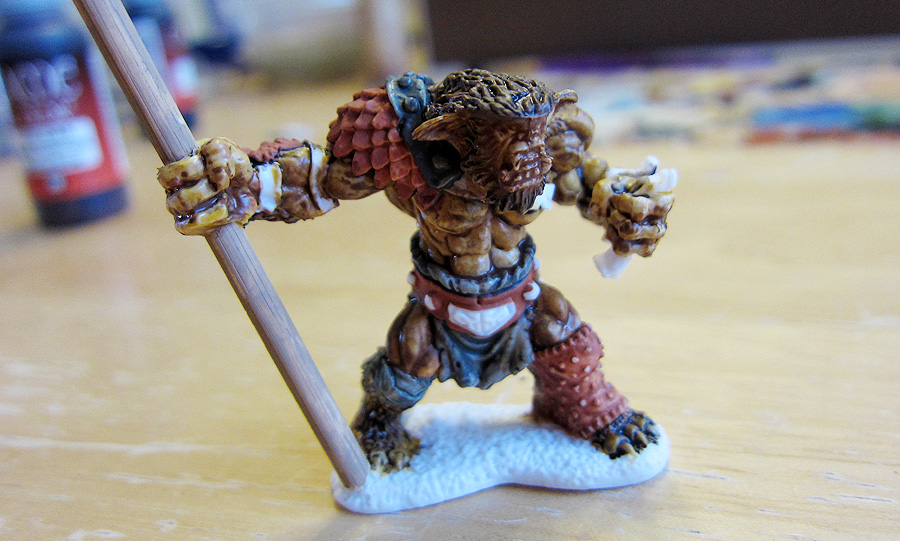
I was happy with my initial tests of painting a Bones figure. For my next test I wanted to see if they could be converted. For this bugbear I wanted to swap out its mornigstar for a spear, remove the spikes from its shield (which were a little over the top for me) and repose the shield arm so it was providing protection to the creature.


First I chopped off the morningstar and shield spike with a hobby kniffe. I also removed the shield to reposition later too. The Bones material is supposed to respond to heat, so I held the figure in boiling water for 45 seconds, bent the shield arm closer to the figure's chest and then held it in ice water for 45 seconds.


I drilled out the bugbear's weapon hand and used a wooden kebab skewer for the spear.


Painting Reaper Bones Bugbear


I usually start by "blocking in" the figure by giving each surface a solid color. I hadn't quite worked out the color scheme for the bugbear, so went about it bit differently this time. I started off blocking in the exposed skin and fur.


Skin blocked in with Vallejo Game Color Plague Brown. The Vallejo paint was a bit thin, but I was pleased with how it took to the Bones material. It almost acted like a wash, seeping into the cracks and crevices of the sculpt, and leaving a tint to the raised areas, naturally shading the figure. I picked up the technique of painting "inside out" from other mini painters. Start with the flesh, then work out (clothing next, followed by boots, belts, straps and packs that are on top of the clothing)


Adding Vallejo Game Color Beasty Brown to the darker fur areas on its head and back. To smooth the transition from the brown fur to lighter skin, I dipped my brush in water, the dipped it in a drop of the paint and applied it to the border between the fur and skin. The thin paint tinted the lighter yellow skin and created a smoother transition between the two.


Mostly blocked in. I chose a warm yellow and brown for the bugbear, and used Vallejo Red Leather and a dark green (a mix of Vallejo Black and light green craft paint) for the various leather armors and cloth items. I wanted the creature's fur and skin to be quite a bit darker than what you see here. The more colorful reds and greens should add some visual interest to the creature, but you can see I've left some of the straps unpainted at this point. I wasn't sure how dark the eventual skin and fur were going to turn out, and I wanted to be sure the straps placed over its skin would contrast.


Next up I added a dark wash. I usually use Games Workshop washes, but I didn't have any in the deep brown shade I was looking for, so I created my own. I put down two drops of Vallejo Game Color Charred Brown on my palette and loaded my paint brush with water. Mixing the two gave a very thin deep brown paint. Brushing it over the brown fur, it worked its way into the deep crevices and tinted the highlights.


I washed all of the exposed skin and fur of the bugbear. Notice how it picked out the details of the creature's face, defined the fingers and toes, etc.


Now that the fur and skin were closer to their final color I picked a light gray for the straps to contrast with the deeper skin color, and finished blocking in the rest of the colors. With a similar wash to the other straps, belts, cloth, and armor, this figure could be considered table ready. I went on to add a few highlights and pick out some details though to finish it off.


The scaled shoulder armor was blocked in with red leather (made from dragon scales maybe?). To highlight them I mix a drop of the Red Leather and a drop of light yellow craft paint. I painted the bottom half of each scale with this lighter shade. Next, I added another drop or two of light yellow to the mix and painted just the edge of each scale. It's a bit fiddly. I used my small detail brush, and hold my breath while I paint the scales. The goal is to get a suggestion of color on each scale, so that at a foot or two of distance the scales "pop".


For metal studs, I painted each black and placed a dot of Vallejo Oily Silver on each one. Teeth were picked out in Vallejo Bone White, tongue in Red Leather, and raised surfaces of the skin (knuckles, the edges of his pecs, thigh muscles, etc.) were given a dab of Vallejo Plague Brown. I wasn't happy with the original shield, so I used the boiling water method to flatten it, then reglued it with super glue into a more traditional position.

I left the base unfinished as I'm planning on creating a unit of these creatures for some mass fantasy battles in the future and will base them all together, but that's a post for another day.


One of the big revelations to me in painting this bugbear up is how well it takes thin paints. The white color of the Bones material allows you to gradually build up colors by applying multiple layers of thinner color. Also, the details on Bones are good, but comparing them to metal versions I think they are a little shallower. I'd be very careful in applying thick paint as it is likely to settle into crevices and obscure detail more easily. Good luck with your own painting! Patience and practice is all it takes :)